
AI Workforce CRM
Run your whole workforce from one screen.
A white-label CRM for firms that hire and place skilled tradespeople. Applicants, your call roster, placements, compliant outreach and reporting live in one place. AIMS, the built-in AI operator, can do anything the signed-in person's role allows.
Proven daily in a live industrial skilled-trades staffing operation.

The walkthrough searches Applicants for a pipe welder near Norfolk, opens his record and moves him to Offer, then Hired. On the Roster it adds him to the Harbor Point crew. It then starts a text campaign: opted-out and do-not-contact people are excluded, the message is checked to fit one text, and the recruiter types the quoted cost before the send button works. It ends on the Crews and fill report.
The problem
Staffing runs on spreadsheets and memory. That breaks the week you get busy.
Your best people are buried in a call list
Years of notes sit across spreadsheet tabs. The welder who said “call me after this job” is one scroll away from gone.
Texting at scale is a compliance minefield
Double sends, missed opt-outs and messages that silently split into three texts cost money, trust and carrier standing.
Nobody can say who rolls off next week
Placement end dates, the bench and margin per hour live in one person's head until that person is out sick.
How it works
From spreadsheet to staffed crew in four moves.
- 1
Bring your people in
Import the roster spreadsheet you already have. Website and job-board applications flow in every day. One person is one record, matched by phone number, never by spelling.
- 2
Find the right crew
Search matches every word, so “pipe welder houston” finds what you meant. Then narrow the list by trade, source and certifications.
- 3
Reach them safely
Text or email in waves. You read real example messages, then type the dollar amount to approve. Opt-outs and do-not-contact records are skipped every time.
- 4
Place, track, repeat
Log placements with full history, see contracts ending soon and margin per hour, and get a weekly report without building one.
Features
Everything a staffing desk does all day, in one system.
Built screen by screen with a working recruiting office, then hardened for the days when everything happens at once.
Stages, notes and a full history for every person, with Undo on every stage change.

Assignment history, contracts with open slots, who comes off a job soon and live margin per hour.

Messy headers, dollar signs and duplicate rows across tabs collapse into one clean record per person.

A shared inbox of every reply that needs a person, oldest first, so a warm “yes” never waits until tomorrow.

Funnel, hire rate by source, fill by contract, utilization by week, reply rate by campaign and who did what.

Careers pages that get found
Job pages with Google-for-Jobs structured data, an Indeed XML feed and applications in English, Spanish and Vietnamese.
Delete with Undo
Undo in about ten seconds, or restore from Recently deleted for 30 days. Texting history is never lost.
Outreach, with guardrails
The computer never spends money on its own.
Every wave shows real example messages and a live cost quote. A person types the dollar amount to send. The character counter catches the one stray symbol that would split a text into three, and opted-out people are skipped before anyone sees the list.
- Waves of 50, each quoted and confirmed
- Do-not-contact never appears in a bulk send
- A second click can't text anyone twice
Unchecked opt-in, STOP recorded instantly, do-not-contact never in a bulk send, CAN-SPAM footer and one-click unsubscribe on email.
- 01
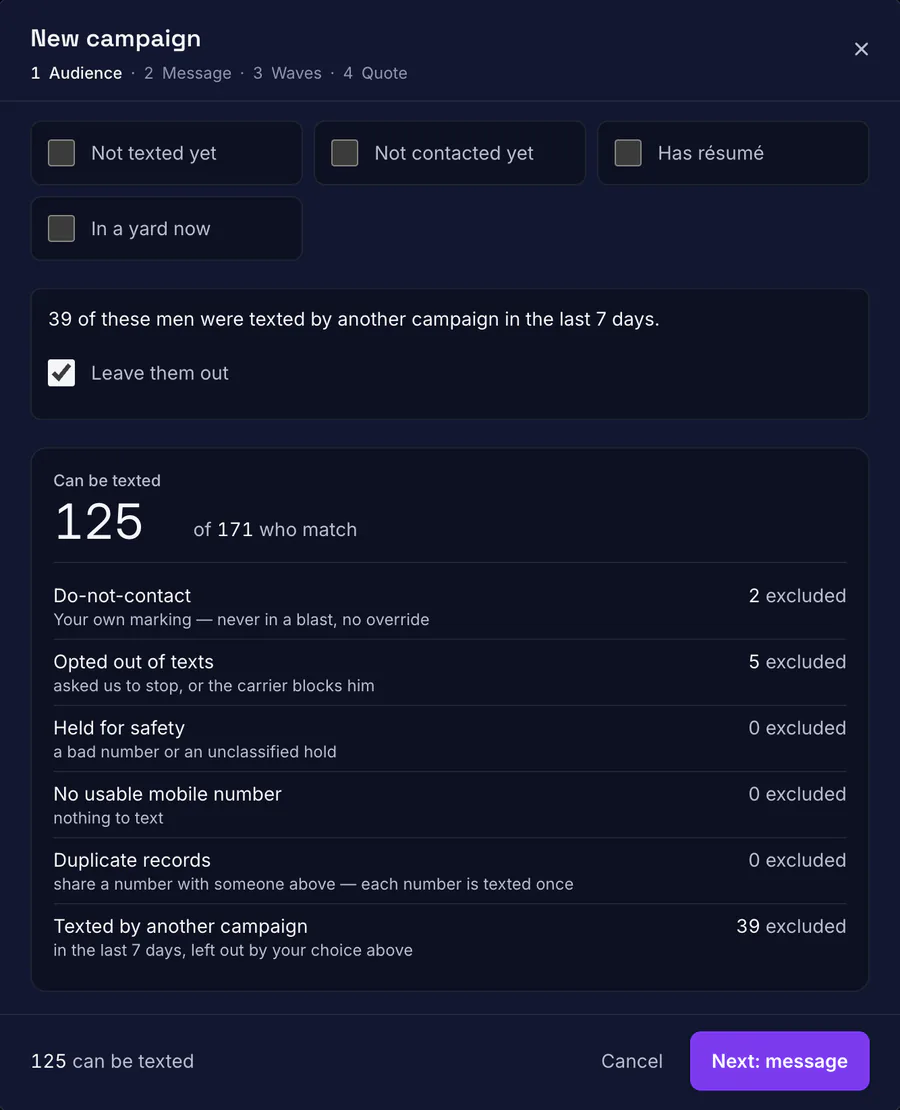
Opt-outs never reach the list
Do-not-contact records, people who replied STOP and anyone texted by another campaign this week are counted and left out before a word is written.
Real product · demo data - 02
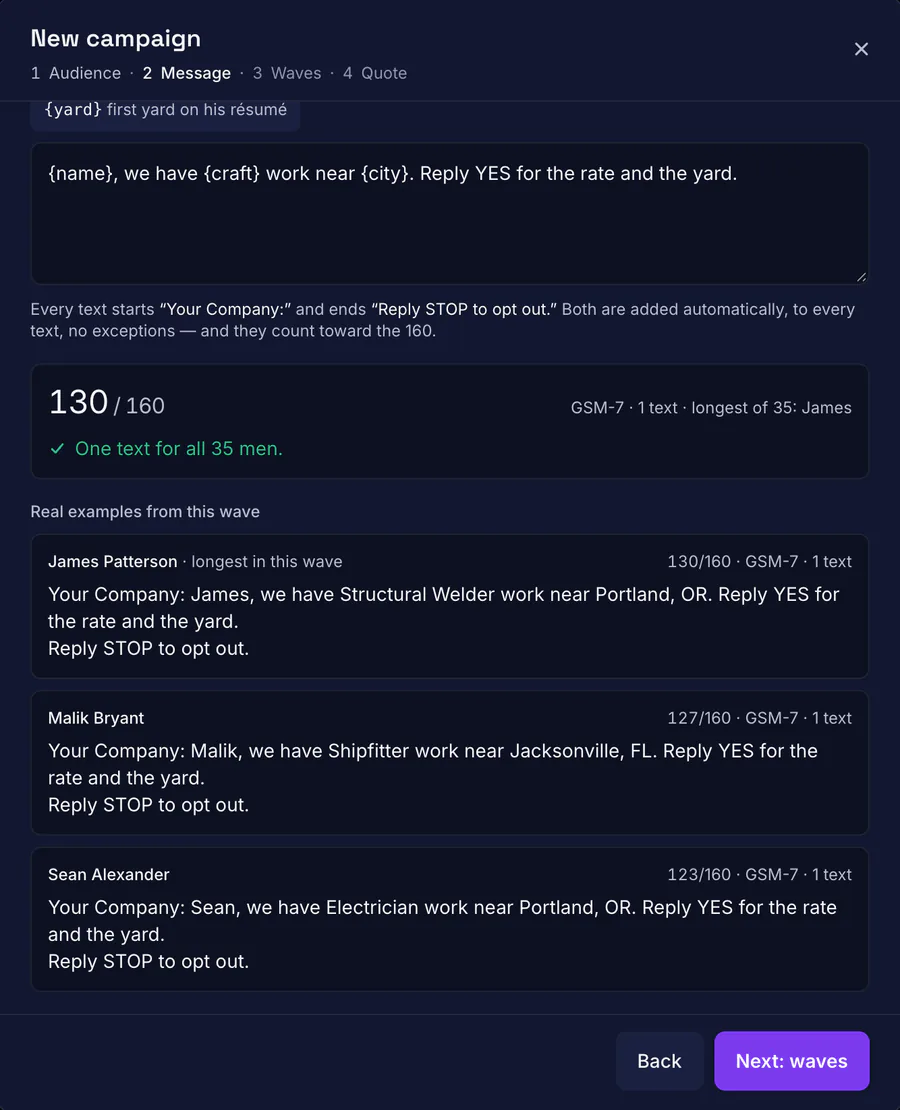
One text, counted before it goes
The counter checks the longest real message in the wave and catches the one stray symbol that would split a text into three.
Real product · demo data - 03
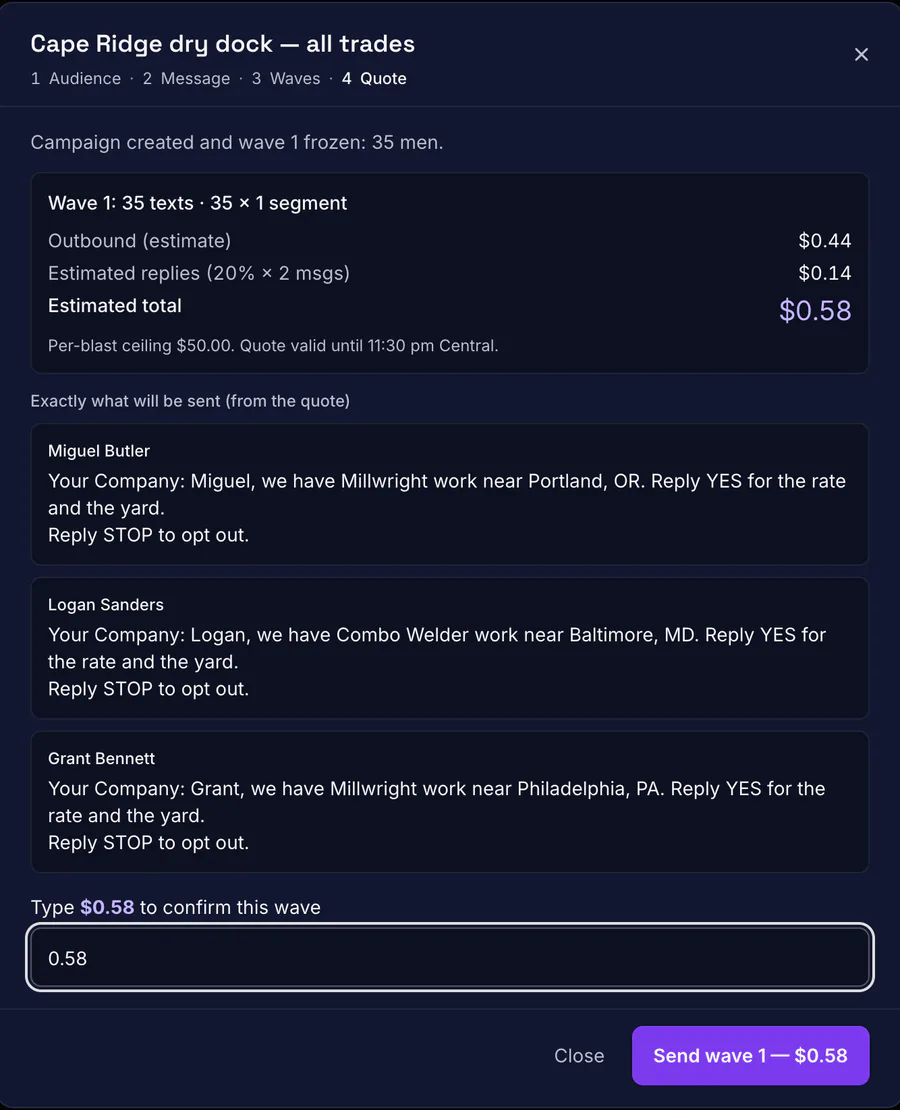
A person types the dollar amount
Every wave shows the exact messages and a live cost quote. The send button stays locked until someone types the total.
Real product · demo data


AI operator
Meet AIMS. An operator, not a chatbot.
AIMS lives inside the CRM. Ask it a question about your live data, or tell it what you need done. It works through the same permission checks as the buttons on the screen, so it can do anything your role allows and nothing more.
- Answers from live records
- “Who comes off assignment in the next two weeks?” gets an answer from the database, not a guess.
- Big moves wait for you
- Sends, deletes, consent changes, account changes and imports need a person's confirmation. Everyday edits come with Undo.
- Records are data, never instructions
- Résumés, notes and inbound texts are treated as untrusted text. Anything AIMS proposes after reading them is flagged on the card.
- Contact details stay out of the model
- Phone numbers, emails, addresses, résumé files and consent evidence are withheld from the AI by design.
- Drafts that sound like a recruiter
- AI drafting writes short, specific outreach using the real pay and offer from your records, never invented numbers.
- A budget it can't overspend
- Every AI action is logged, and a monthly AI budget refuses new requests once it is used up.
AIMS is in final testing. Early-access partners get it first. AI drafting for outreach is already built into the CRM.

A recruiter asks AIMS for pipe welders with five or more years in a yard who opted in to texts. AIMS checks the applicant list and names four. The recruiter asks it to move the top three to Interview. AIMS prepares one change as a card; nothing moves until the recruiter presses Confirm, and the card then shows a receipt with Undo.


Proof
Built inside a live operation, not a demo room.
The CRM runs every day at an industrial skilled-trades staffing firm. We keep the client's name and data private. The software is ours.
Applications every day
New applicants arrive daily from the company website and a construction job board, straight into the pipeline.
A multi-year roster, cleaned up
Years of calling notes across trade tabs were imported, de-duplicated by phone number and made searchable.
Shipped to phones and screen readers
Works on phones, tablets and folding devices, and is fully usable from the keyboard and with a screen reader.


White-label & licensing
Your brand on the door. Our engine underneath.
The Workforce CRM is licensed white-label. Your team and your applicants see your company, not ours.
Pricing
Talk to us
Early-access pricing is set per company, based on team size and messaging volume.
- Your name, logo and colors throughout the app
- Runs on your own domain
- Rename the AI assistant and set its playbook and time zone
- Your records stay yours and are never used to seed another customer's system
- Set up and maintained by Digital Gravity
FAQ
Questions buyers ask first.
Who is the AI Workforce CRM for?
Staffing firms and contractors who hire, place and redeploy skilled tradespeople, such as welders, fitters, electricians and crews, and who have outgrown spreadsheets and group texts.
What does early access mean?
The core CRM runs in production every day. The AI operator and a few features are being finished. Early-access partners get hands-on setup and help decide what ships next.
Can the CRM carry our brand?
Yes. It is licensed white-label: your name, logo, colors and domain, and you can rename the AI assistant.
Does the AI see our applicants' private details?
AIMS reads only what the signed-in person's role can see, through the same permission checks as the screens. Phone numbers, emails, addresses, résumé files and consent records are withheld from the model.
How does it keep text messaging compliant?
Opt-in starts unchecked, STOP is recorded automatically, do-not-contact records are never included in a bulk send, the database refuses double sends, and nothing goes out until a person approves the cost.
Can we bring our existing spreadsheets?
Yes. The importer reads common spreadsheet headers, cleans up rates and dates, and merges duplicate rows into one record per person.
How much does it cost?
Pricing depends on team size and messaging volume. Book a call and we will walk through the CRM and quote it for your firm.

See the Workforce CRM with your own workflow.
Twenty minutes on a call. Bring a sample of your roster spreadsheet and we will show you where it lands.
Book a demo